Plan before generation
Review the story, pacing, and scene intent before CapyFrame changes the composition.



Start with a brief, approve the plan, and shape every scene without leaving the conversation.
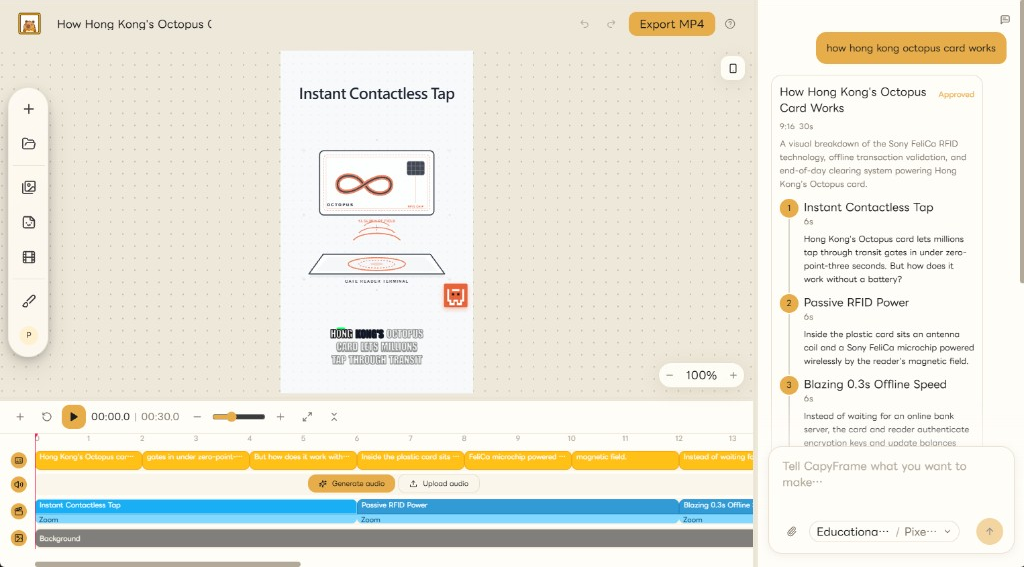
Review the story, pacing, and scene intent before CapyFrame changes the composition.
Set your logo, colors, tone, and reusable mascot actions once, then carry them into every video.
Choose a visual theme, then layer kinetic captions, timing, and mascot actions into the composition.
Queue finished videos for social channels so each campaign keeps moving after export.
Try the full planning flow on included credit.
$0/month
$2.00 AI credit included each UTC month
For regular short-form production.
$15/month
$20.00 AI credit included each UTC month
For teams producing longer videos at volume.
$30/month
$50.00 AI credit included each UTC month
You describe the video in chat. CapyFrame proposes a structured plan you can edit. After you approve it, scenes are written in the same workspace so you can preview and refine without switching tools.
AI credit is the token budget used when CapyFrame plans, writes, and builds scenes. Input tokens cost $1.50 per million and output tokens cost $7.50 per million. Chat, approve and generate, scene visuals, stickers, and avatar transcription use this credit. Turning on 3 illustration options generates three scene visuals and spends more of the same pool. Unused credit does not roll over or top up.
AI credit, exports, and AI voice minutes reset at the start of each UTC month. Storage is an account total and does not reset. We do not count how many videos you make.
No. The composition stays untouched until you approve the plan. Later scene edits also wait for your confirmation, so the studio never runs ahead of you.
Set your logo, colors, tone, and reusable mascot once. New videos pick them up, so you are not restyling from scratch each time.
Your project stays in the workspace. Download the MP4 when you need the file, and export again from the same project whenever you want a fresh copy.
Stay on Free while you try the full planning flow. Choose Creator or Pro when you need more AI credit, longer videos, voice minutes, storage, or monthly exports.